


Azahar Emulator
3.6407.00 Reviews
App Specs
- Version
- 2126.0-googleplay
- Updated On
- License
- Free
- Downloads
- 1,000,000+
- Developer
- Azahar Emulator Developers
- Categories
- Arcade
- Platform
- Android
Screenshots
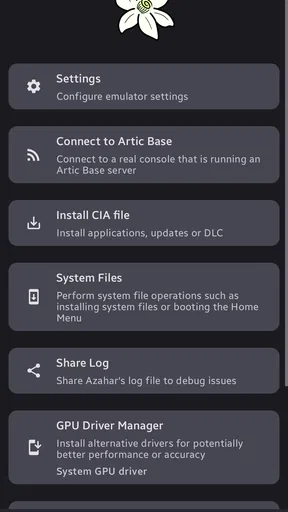
 Analysis by AppCompare
Azahar Emulator is an arcade-focused game for Android that takes a different route from the usual mobile download. Instead of offering its own levels, characters, or progression system, it provides an open-source 3DS emulation environment based on Citra. I spent time looking at it as a practical tool rather than judging it like a conventional arcade title, and that distinction matters from the first launch.
My overall impression is that it can be genuinely useful for people who already understand emulation and have the right games and hardware for the job. For someone expecting an instant, polished arcade experience, it is a much less straightforward choice. The appeal is control, flexibility, and the possibility of bringing a 3DS library to a compatible Android device. The trade-off is that the quality of the experience depends heavily on the phone, the game, the user’s setup, and their willingness to troubleshoot.
What Azahar Emulator is really offering
The developer, Azahar Emulator Developers, presents this as an open-source 3DS emulator based on Citra. That wording tells me more than the short label “Azahar Emulator” does. This is not a self-contained arcade game with content included inside the app. It is a piece of software intended to reproduce the behavior of another gaming platform, so the user experience begins with preparation rather than immediate play.
That makes the app especially interesting for people who want to revisit games they already own in a more portable way. It can also suit users who enjoy testing settings, comparing rendering behavior, and learning how emulation works. If your priority is pressing one button and receiving a perfectly consistent result, the usual native Android arcade game will probably feel more comfortable.
The app is free, which removes one obvious barrier to trying it. I would still separate “free to install” from “free gaming experience.” The emulator itself does not turn a phone into a complete 3DS library, and the time needed to organize legitimate game files, configure controls, and find stable settings is part of the real cost. That cost is measured in patience rather than a purchase price.
Its age rating is Everyone, so the software is presented for a broad audience. In practice, the technical side may be easier for older users or families who already have someone comfortable with folders, controller mapping, and device settings. The rating describes the app’s general content position, not how simple the setup feels.
Installation is only the first step
On a compatible Android device, installing the application is the easy part. The more important question is what happens afterward. You need to understand where your legally obtained game files are stored, how the emulator finds them, and which control method makes sense for the particular title you want to play. A touchscreen can work, but it is not automatically the best answer for games designed around physical buttons and a second screen.
Worth Reading Before You Choose

EA SPORTS FC Mobile 26 Is a Bigger Football Game, but It Takes Time

Flipboard Shows What News Apps Must Do Beyond the Feed

Switching to Android Auto Means Rethinking Your Driving Routine

Google Calendar Makes a Crowded Week Easier to Manage

Ludo King Makes the Most of the Minutes Between Plans

Baby Panda World Brings Quick Play to Modern Phones, but Its Game Library Feels Busy
I recommend treating the first session as a setup session instead of expecting a finished gaming night. Start with one game, keep your files organized in a dedicated location, and change one setting at a time. When several options are altered together, it becomes difficult to know which change fixed a problem or caused a new one.
A useful habit is to make a note of the original settings before experimenting. Emulation often involves trade-offs between visual quality, speed, battery use, and stability. If a game becomes slower after a graphics adjustment, returning to a known baseline is much quicker than trying to remember every change you made.
Why the phone matters so much
The current version is 2126.0-googleplay, and the minimum operating system is Android 10. Those details define basic compatibility, but they do not guarantee that every 3DS game will perform in the same way. Two devices that both meet the operating-system requirement can still deliver very different results because of their processors, graphics hardware, thermal behavior, display shape, and available memory.
This is one of the first limitations I would explain to a friend. An emulator is not like a simple puzzle game where the same download usually behaves similarly on most modern phones. Some titles may be comfortable on your device while others require more patience. Long sessions can also expose heat or battery concerns that are not obvious during a short test.
Before committing to a large library, I would test the specific game you care about most. That approach is more useful than judging the app from a single successful launch. It also prevents a common disappointment: assuming that a good result with one title means every other title will behave identically.
Fairness, spending, and the pressure to keep playing
Because Azahar is an emulator rather than a conventional arcade game, the usual questions about energy systems, premium currency, loot boxes, and pay-to-win progression do not define the experience in the same way. The app is free, and I did not approach it as a game that pushes me through a store or asks me to buy power to compete.
That does not mean there is no spending context. Users may already own a phone, a controller, storage, and games they are entitled to use. Those surrounding costs are separate from the emulator itself, but they affect how affordable the complete setup feels. I would not describe the app as a complete zero-cost replacement for a 3DS, because the hardware and game ownership questions remain important.
The strongest form of fairness here is that the emulator does not appear to frame progress around spending. There is no reason for me to expect a stronger character, faster upgrade, or competitive advantage simply because another player paid more inside the app. This makes it fundamentally different from many mobile arcade games that use short sessions to encourage repeated purchases.
At the same time, the app can create a different kind of pressure: technical pressure. When a game stutters, crashes, displays an odd visual effect, or responds poorly to touch controls, the temptation is to keep changing settings until it works. That can turn a relaxed gaming session into a troubleshooting project. I consider this the main “cost” of the experience for many users.
Progress belongs to the game, not the emulator
Another useful distinction is where progress comes from. Azahar Emulator is the platform layer; the progress systems belong to the individual 3DS games you run through it. That means fairness, difficulty, unlocks, and saving behavior can vary according to the title rather than being controlled by one universal mobile design.
This is good news if you dislike the pressure found in many free-to-play arcade releases. You are not being asked to wait for an energy refill simply because the emulator is installed. But it also means I cannot promise one consistent experience across every game. A title built around precise buttons may feel awkward on a screen, while another may adapt more naturally to touch input.
For everyday use, I found the best mindset is to choose one or two games that suit the device and control setup instead of treating the emulator as a guarantee that an entire library will be equally enjoyable. The app gives you an opportunity; it does not remove the design choices or technical demands of the original software.
Competitive fairness and practical control choices
Competitive fairness is complicated when an emulator is used for games that were designed for dedicated hardware. A phone may offer a different screen, different input latency, and different performance characteristics from an original 3DS. If you are playing alone, those differences are mostly a matter of comfort. If you are comparing results with other players, they can become part of the conversation.
I would be cautious about treating an emulated session as a perfectly identical competitive environment. That is not an accusation against the app; it is a consequence of moving software between devices. Touch controls, external controllers, display scaling, and performance settings can all change how a game feels. For personal play, those options are valuable. For serious competition, consistency matters more than flexibility.
A physical controller can make a major practical difference for games that rely on directional precision, repeated button presses, or quick reactions. Touch controls keep the setup simple, but fingers can cover important parts of the screen and provide less tactile feedback. I would begin with touch input for testing, then consider a controller if the game is clearly fighting against the phone’s layout.
There is also a two-screen question. A 3DS game was designed around a particular relationship between its screens, while an Android phone usually presents a single display. The emulator can make the software accessible, but the physical arrangement may still feel less natural. Some games will tolerate that change better than others, especially when the lower screen is used mainly for menus rather than constant action.
Three setup lessons that save time
First, I would avoid chasing the highest visual quality immediately. A stable, readable image is more valuable than an impressive screenshot if the game slows down during play. Once the basic experience is reliable, make small visual changes and check whether the improvement is worth the performance trade-off.
Second, keep a simple per-game note. Record the control arrangement and the few settings that work well for that title. This is more useful than searching for one universal configuration, because different games can place different demands on the emulator. It also makes the app easier to return to after an update or a long break.
Third, test saving and resuming before investing hours in a session. Emulation adds another layer between the game and the device, so I prefer confirming that the normal save flow feels dependable before relying on it for a long playthrough. This is a small precaution, but it prevents a much bigger frustration later.
Who should use it, and who should skip it
I think Azahar Emulator is a strong candidate for an Android user who already owns suitable 3DS games, enjoys experimenting, and accepts that compatibility is not identical across every title. It is also appealing to preservation-minded players who want an open-source project rather than a closed, highly monetized mobile game.
It is less suitable for someone who wants a new arcade game with built-in content, simple touch controls, and no preparation. It is also not my first recommendation for a child who will be expected to solve technical problems alone. The Everyone rating makes the app broadly accessible in terms of content, but the setup process still benefits from adult guidance when files, storage, and controllers are involved.
Compared with a native Android arcade game, this emulator offers a wider range of possible experiences but less certainty. A native title is usually designed around the phone’s screen, current input methods, and supported hardware. Azahar instead opens the door to a different platform, which can be far more rewarding for the right user and far more frustrating for the wrong one.
Compared with playing on original hardware, the advantage is convenience and the possibility of using a device you already carry. The disadvantage is that the phone does not reproduce every physical detail of a 3DS. If the original dual-screen layout, buttons, or hardware features are central to your enjoyment, dedicated hardware may remain the better choice.
What I would check before trusting it with a library
The app has reached over a million installs, with an average rating of 3.7 from around five thousand ratings and hundreds of written reviews. I read those figures as evidence of meaningful interest rather than a guarantee of universal satisfaction. An emulator naturally attracts both enthusiastic users who enjoy configuring it and disappointed users whose particular device or game did not behave as hoped.
That mixed impression makes sense. A conventional game can often be judged by its art, controls, and content in a single session. An emulator must be judged through a chain of conditions: the Android device, the game file, the input method, the display arrangement, and the settings. A problem anywhere in that chain can feel like a problem with the app, even when the underlying cause is more specific.
My trust test would therefore be practical. I would install it on the device I actually plan to use, try a legally obtained game that matters to me, check controls and saving, and then play for long enough to notice heat or slowdown. If that test goes well, the app becomes much easier to recommend. If it does not, I would not assume that buying accessories or changing dozens of options will automatically solve everything.
The open-source nature is another reason I take the project seriously, but it should not be confused with a promise that every feature will work perfectly for every person. Open development can encourage inspection and improvement, while emulation itself remains a technically demanding task. I value the transparency implied by that model, yet I still judge the app by the concrete experience on my own phone.
My verdict after looking beyond the download button
Azahar Emulator is not an arcade game in the ordinary sense, and that is both its identity and its main challenge. It is a free Android tool for running 3DS software, built by Azahar Emulator Developers and based on Citra. The current release supports Android 10 and later, while the project’s broad audience and large install base show that many people are willing to explore this approach.
I would recommend it to a patient player who values access, experimentation, and control over a perfectly effortless setup. I would especially recommend starting small: one game, one control method, and a conservative configuration. That workflow gives you a fair view of what the emulator can do without turning the first evening into an endless settings exercise.
I would skip it if what you really want is a self-contained mobile arcade experience or if technical inconsistency would quickly ruin your enjoyment. A native Android game will usually be the better choice for instant play, while original 3DS hardware may be preferable when the dual-screen design and physical controls are essential.
My final judgment is cautiously positive: the app earns trust as a serious, free emulation project, but it deserves realistic expectations. Its value is not in promising that every game will run identically; its value is in giving the right Android user a flexible way to explore 3DS software without building the experience around in-app spending. If you are comfortable with that trade-off, it is worth testing. If you want certainty and simplicity, choose the alternative that matches those priorities instead.
Pros
- Supports many Nintendo 3DS games with strong compatibility.
- Offers save states for quickly resuming games.
- Includes customizable controls and external controller support.
- Can improve visuals with resolution and texture enhancements.
- Open-source development brings transparency and frequent improvements.
Cons
- Performance varies greatly between devices and games.
- Requires legally dumped game files; it does not provide games.
- Setup can be confusing for users unfamiliar with emulation.
- High-resolution rendering may cause overheating or battery drain.
- Some games still have glitches
- crashes
- or incomplete features.
FAQs for Azahar Emulator
What is Azahar Emulator, and what platforms does it support?
Azahar Emulator is an open-source Nintendo 3DS emulator designed to run compatible 3DS games and applications on modern devices. It is primarily available for Android, Windows, Linux, and macOS, although performance and feature availability can differ between platforms. Before installing it, check that your device meets the recommended requirements and remember that the emulator does not include commercial games or copyrighted system files.
Can Azahar Emulator run every Nintendo 3DS game?
No emulator can guarantee perfect compatibility with every Nintendo 3DS title, and Azahar is no exception. Many games can boot and run well, while others may experience graphical glitches, audio problems, crashes, missing features, or poor performance. Results depend on the specific game, emulator version, device hardware, graphics drivers, and configuration. Checking current compatibility information is recommended before expecting a particular title to work flawlessly.
What do I need to use Azahar Emulator legally?
Azahar Emulator itself is legal software, but users are responsible for obtaining games and system files legally. You generally need your own Nintendo 3DS console and legally purchased games to create personal backups, along with the required system data when applicable. Downloading copyrighted ROMs, firmware, or keys from unauthorized websites may violate copyright laws and can expose your device to unsafe files.
What Android hardware is recommended for Azahar Emulator?
Performance varies considerably, but Azahar generally works best on relatively modern Android phones or tablets with a capable 64-bit processor, strong GPU, updated operating system, and sufficient memory. More demanding games may require upper-mid-range or flagship hardware for stable frame rates. Even powerful devices can need per-game settings adjustments, such as resolution scaling, graphics backend selection, or shader-related options.
Is Azahar Emulator safe to download and use?
Azahar is safest when downloaded from its official project pages or trusted distribution channels, where users can verify the authentic release and installation files. Avoid modified APKs, unofficial “preloaded” packages, and websites promising free games or system files, since these may contain malware or unwanted software. Keep the emulator updated, review requested permissions, and back up save data before changing versions or settings.


